

Temp Mail by Never Zero Lab is a free Chrome extension that gives you a temp mail address in one click: a disposable inbox on mail.tm, with Guerrilla Mail as a backup, where emails and verification codes arrive live in your toolbar.
Temp Mail lives in your Chrome toolbar. Open it and a temporary address is already there: copy it, or press Fill in to type it into the email field on the page. Emails arrive on their own, and verification codes show up right in the list, one click to copy. Your real inbox stays out of sign-ups, trials and newsletters.
At a glance
- Price
- Free
- Account
- Not needed
- Mail services
- mail.tm (main) and Guerrilla Mail (backup)
- mail.tm inbox
- Private, protected by a password
- Guerrilla Mail inbox
- Public, emails deleted after 1 hour
- Address history
- Up to 20 addresses, kept only in this browser
- Ads
- None
- Usage statistics
- Three anonymous events, can be switched off
- Shortcuts
- Alt+Shift+M opens Temp Mail, Alt+Shift+E inserts the address
- Languages
- English, German, Spanish, French, Italian, Romanian and Russian
- Works in
- Google Chrome 116 or later on a computer
- Version
- 1.2.1
- Updated
- November 14, 2026
- Made by
- Never Zero Lab
- Chrome Web Store
- Temp Mail listing
What it does
An address right away
Open Temp Mail and a readable address like quietotter482@… is ready. Click it to copy.
A live inbox
New emails appear without a refresh. The toolbar icon counts unread ones, and desktop notifications are there if you want them.
Codes in one click
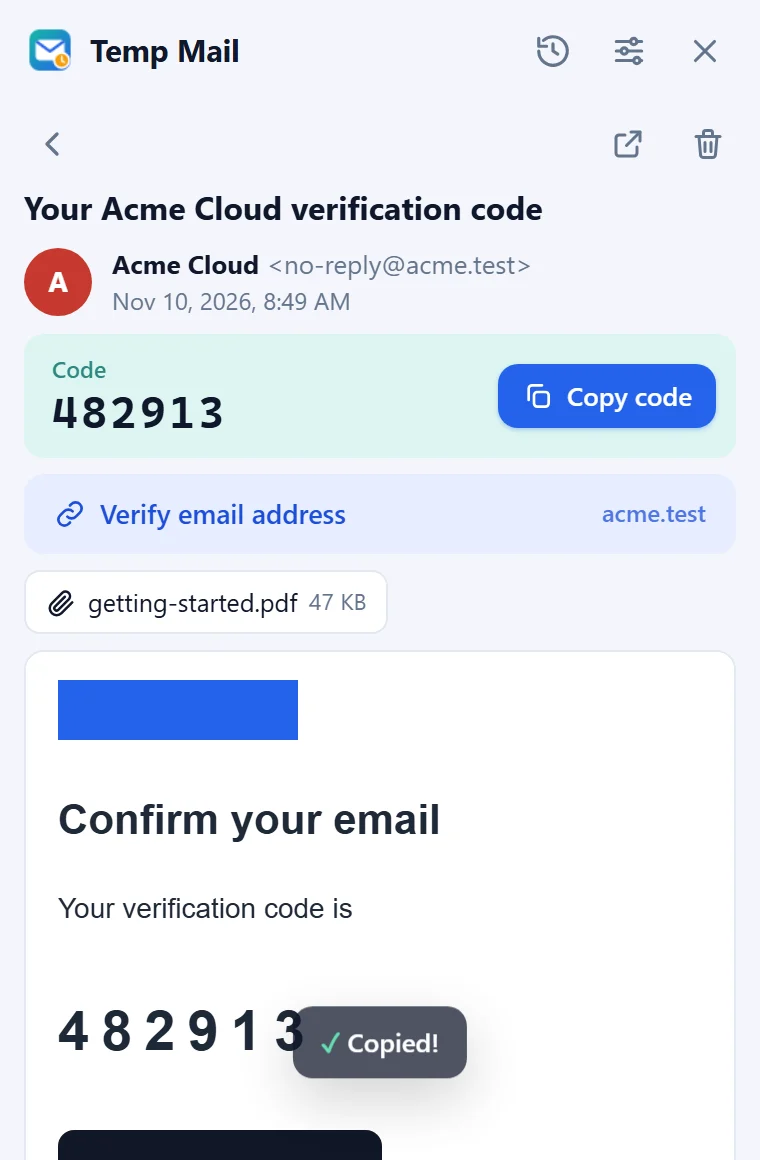
Verification codes show up next to the subject, one click to copy. Confirmation links get their own button.
Fills sign-up forms
Press Fill in, right-click an email field or press Alt+Shift+E. A Confirm email field is filled too; passwords are never touched.
Your own name and history
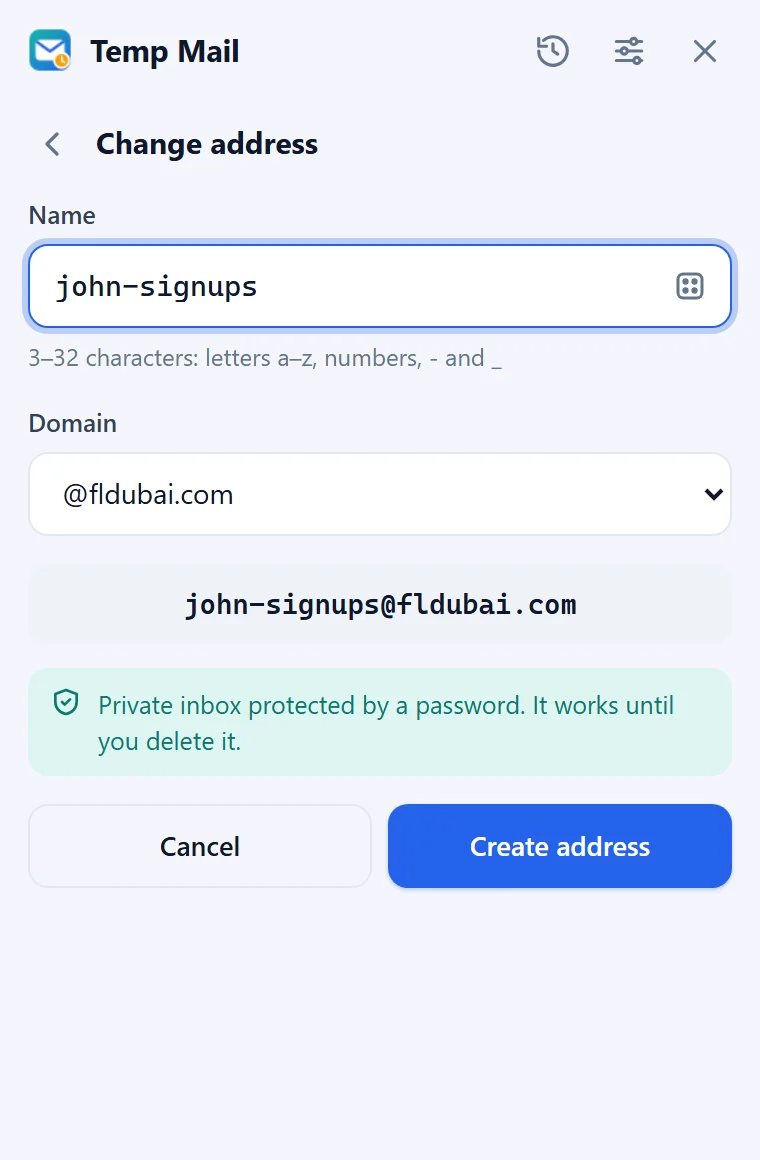
Pick your own name and domain, keep up to 20 addresses and switch back to an earlier one when you need it.
Safe email viewer
Emails open in an isolated frame where scripts cannot run, and remote images stay hidden until you allow them.
How it looks

How to use it
Pin the icon
Click the puzzle piece in the Chrome toolbar and pin Temp Mail, so it is always one click away.
Use the address
Open Temp Mail and press Copy, or press Fill in to put the address into the email field on the page.
Get the code
Emails arrive on their own. Click the code next to the email to copy it, or open the email and press the confirmation link.
Keep it or delete it
Your addresses stay in the history, so you can come back to one later. When you are done, the trash icon removes the address from Temp Mail and asks the mail service to delete it too.
How it works
Temp Mail has no mail server of its own. When you open it the first time, it creates a mailbox on mail.tm, a public temporary email service, with a readable random name and a random password. If mail.tm is not available, the address is created on Guerrilla Mail instead.
While the window is open, new emails come in through mail.tm's live updates and a regular check. When the window is closed, the extension checks the active address in the background: every minute during the first hour after you used it, every 5 minutes up to a day, then every 30 minutes. The toolbar icon shows how many emails are unread.
Codes and confirmation links are found on your computer, inside the email, so you can copy or open them in one click. The full text of an email is loaded from the mail service only when you open it, and it is shown in an isolated frame where scripts and forms cannot run.
Inserting the address works only when you ask for it: Chrome then lets Temp Mail into that one tab to type the address into the email field. Before and after that, the extension does not read the pages you visit. More in Is temp mail safe?
Who it's for
Good for
- Sign-ups, free trials, downloads and coupons where you only need to confirm an email once.
- Keeping newsletters and marketing lists out of your real inbox.
- Developers and testers who check sign-up flows and need a fresh address each time.
Not the best for
- Banking, work and other accounts you may need to recover later: use your real address there.
- Sending email: Temp Mail only receives.
- Websites that block temporary email domains: some refuse them, whatever the service.
- Phones and tablets: Chrome extensions work in Chrome on a computer.
Your data
- To create addresses and receive emails, Temp Mail talks directly to mail.tm or, as a backup, Guerrilla Mail. Like any website, they receive your IP address with each request, and they receive the emails sent to your temporary address. We run no mail server and never receive your addresses, emails or codes.
- A mail.tm inbox is private: only someone with its password can read it. Guerrilla Mail inboxes are public: anyone who types the same name can read them, and emails are deleted after one hour. Temp Mail warns you before you pick such an address.
- Your addresses (up to 20), the password of each mail.tm inbox, the list of received emails and your settings are kept only in this browser. Uninstalling the extension removes them.
- Temp Mail counts three anonymous events with Google Analytics: an address was created, an email arrived, a code was copied. Each event has only its name, a random installation ID and a session number, never addresses, emails or codes. Turn it off in Settings → Anonymous usage statistics.
- Remote images in emails stay hidden until you press Show images, so a tracking pixel cannot tell the sender you opened the email. No account and no ads.
Questions
Is Temp Mail free?
Yes. Temp Mail is free, needs no account and shows no ads.
Is the inbox private?
Addresses on mail.tm, the main service, are private inboxes protected by a password that Temp Mail creates for you. Addresses on Guerrilla Mail domains are public: anyone who types the same name can read them, and emails are deleted after one hour. Temp Mail marks them clearly before you choose one.
Can I get the same address back later?
Yes. Temp Mail keeps up to 20 addresses in its history; open the history and press Use. For a mail.tm address it also shows the password, so you can sign in on mail.tm and read the inbox on another device.
How long does a temporary address last?
A mail.tm address stays in your list until you delete it. If the mail service stops serving it, Temp Mail tells you the address no longer exists and you can create a new one. Emails on Guerrilla Mail addresses are deleted after one hour.
Why does a website not accept my temporary address?
Some websites block known temporary email domains. Press Edit and try another domain, or use your real address for that site.
Can I send emails from Temp Mail?
No. Temp Mail only receives emails: it is made for sign-ups, verification codes and confirmation links.
Does Temp Mail read the websites I visit?
No. It gets access to a tab only when you press Fill in, choose Insert temp email address in the right-click menu or press Alt+Shift+E, and then it only types your address into the email field.
Does Temp Mail work on phones?
No. Chrome extensions work in Chrome on a computer: Windows, macOS, Linux or ChromeOS.
Temp Mail guides and answers
-
Question
What is a temporary email address and when should you use one?
A temporary email address is a short-lived inbox you use instead of your own for sign-ups and trials. When it helps, when your real address is better.
-
Question
Is temp mail safe?
Temp mail keeps your real address away from sign-ups and spam, but the mail service sees what arrives and a lost address cannot be recovered. The limits.
-
Guide
How to get a verification code with temp mail
Sign up with a temporary email in Chrome and copy the verification code in one click: copy or fill in the address, wait for the email, click the code.