
Finance · Chrome extension
Money Converter
Any amount in any currency, one click away.

Money Converter by Never Zero Lab is a free Chrome extension that converts money between 160+ currencies, crypto coins and precious metals in your toolbar, using daily reference rates from central banks and other public sources, with rate charts and right-click conversion of prices on any page.
Money Converter lives in your Chrome toolbar. Type an amount in either field and the other one updates as you type; press the arrows to swap the pair. Under the converter you see the rate and its inverse, a rate chart and My currencies: one amount in all the currencies you care about. Select a price on a shop page and right-click to convert it without leaving the page.
At a glance
- Price
- Free
- Account
- Not needed
- Currencies
- 160+ currencies, 23 cryptocurrencies, gold, silver, platinum and palladium
- Rates
- Mid-market reference rates, mainly from central banks via Frankfurter; published once a day, checked every hour
- Crypto prices
- Refreshed from Coinbase at most once a minute while a coin is on screen
- Rate chart
- 1 week, 1 month, 1 year, 5 years and the longest history the source has
- Offline
- Works with the last saved rates and shows their date
- Ads and analytics
- None
- Shortcuts
- Alt+Shift+M opens it on Windows, macOS and Linux; type mc and a space in the address bar to convert there
- Languages
- 52, including English, German, French, Spanish, Italian, Romanian and Russian
- Works in
- Google Chrome 120 or later on a computer
- Version
- 1.1.2
- Updated
- November 17, 2026
- Made by
- Never Zero Lab
What it does
Two fields, both ways
Type in either field and the other one updates with every digit. The arrows swap the currencies together with the amounts.
160+ currencies, crypto and gold
Search by code, name, country or symbol: “japan”, “₹” or “bitcoin” all work. Gold, silver, platinum and palladium are priced per troy ounce.
Rate charts
See how a rate moved over a week, a month, a year, five years or as far back as the source goes, with the change, the low and the high.
My currencies
One amount in a whole list of currencies at once. Add, remove and reorder them; click one to put it in the converter.
Prices on any page
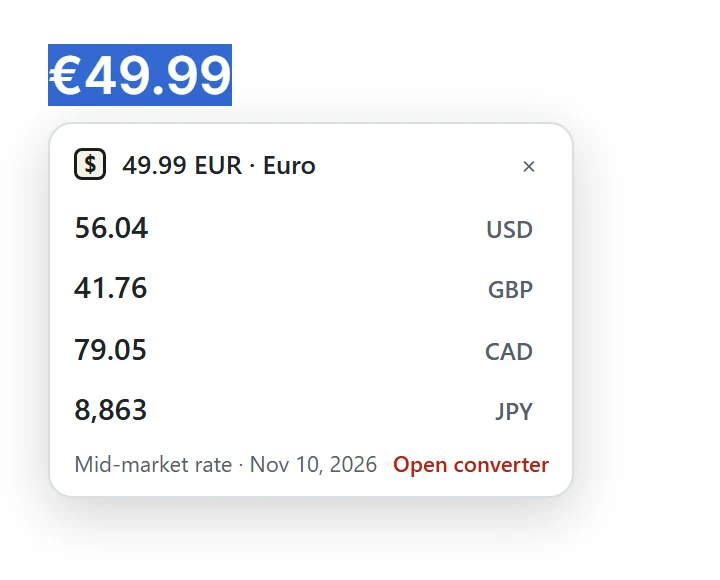
Select a price like €49.99, right-click and choose Convert: the result appears next to it. Or type mc 100 usd to eur in the address bar.
Math and bank fees
Type 120*3+15, 5k or 2.5m right in the amount. Set a bank or card fee from 0 to 10% to see what you would really get.
How it looks
How to use it
Pin the icon
Click the puzzle piece in the Chrome toolbar and pin Money Converter, or open it with Alt+Shift+M (Windows, macOS and Linux).
Type an amount
Type in either field. Click a currency to pick another one: search by code, name, country or symbol.
Swap and compare
Press the arrows to flip the pair. Add currencies to My currencies to see one amount in all of them.
Convert prices on pages
Select a price on any page and right-click → Convert, or select it and click the icon to put the amount in the converter.
How it works
Money Converter keeps one table of exchange rates against the US dollar and works out any pair on your computer. The table comes from Frankfurter, a free open-source service that collects reference rates from central banks and other official sources. If Frankfurter does not answer, the extension asks two backup services, the Currency API by fawazahmed0 and ExchangeRate-API, and on the very first run without a connection it uses rates saved inside the extension.
These are mid-market reference rates, not live market quotes: the sources publish them once a day. The extension checks for new rates every hour in the background, shows when they were updated and warns you when the saved rates are more than two days old. Crypto prices move all day, so while a coin is on screen they are refreshed from Coinbase's public exchange rates, at most once a minute.
The chart is loaded from Frankfurter for the pair on screen and kept until the next day. Not every pair has a history; when there is none, the chart says so.
The extension reads a web page only when you ask it to: when you click its icon or choose Convert in the right-click menu. Then it reads just the text you selected, finds the amount and currency on your computer, and shows the result. That text is never sent anywhere. More in Where do the exchange rates come from?
Who it's for
Good for
- Shopping on foreign websites: convert a price without leaving the page.
- Planning a trip or a budget in another currency.
- Invoices and freelance work: one amount in several currencies at once.
- Checking how a currency moved over the last weeks, months or years.
Not the best for
- Trading: the rates are daily reference rates, not live market quotes.
- Knowing the exact amount your bank will charge: banks use their own rates and fees; the fee setting only gives an estimate.
- Converting an amount at a past date: the chart shows history, but the converter uses the latest rates.
- Sending or exchanging money: Money Converter only calculates.
- Phones and tablets: Chrome extensions work in Chrome on a computer.
Your data
- To get exchange rates, Money Converter downloads public data from Frankfurter, the Currency API by fawazahmed0 (latest.currency-api.pages.dev and cdn.jsdelivr.net), ExchangeRate-API open access (open.er-api.com) and, only when a crypto coin is shown, Coinbase's public exchange rates (api.coinbase.com). The requests contain only currency codes and dates; like any website, these services receive your IP address.
- Text you select on a page is read only when you click the icon or choose Convert in the right-click menu. It is processed on your computer to find the amount, and it is never sent anywhere or saved. The extension has no permission to read websites in the background.
- Your currencies, amount, theme, fee and other settings are saved in Chrome's storage. If Chrome sync is on, Chrome copies them to your other computers through your Google account; we cannot see them. Rates and chart data are cached in this browser so the converter works offline.
- No account, no ads and no analytics: we do not collect, sell or share personal data or your browsing history.
Questions
Is Money Converter free?
Yes. Money Converter is free, needs no account and shows no ads.
Are the exchange rates real time?
No. Money Converter uses mid-market reference rates that central banks and other sources publish once a day; it checks for new ones every hour. Crypto prices are refreshed more often, at most once a minute while a coin is on screen. For trading, use live market quotes.
Why does my bank give me a different rate?
Money Converter shows the mid-market rate, the middle between buying and selling prices. Banks and card networks use their own rates and add fees. Set your bank or card fee in Settings (0 to 10%) to see roughly what you would get.
Does it work offline?
Yes, with the last rates it saved, and it shows their date. The chart needs an internet connection.
Can it convert prices on a web page?
Yes. Select a price such as €49.99, right-click and choose Convert: a small bubble shows it in other currencies. Or select the price and click the toolbar icon to put the amount into the converter.
Does Money Converter read the websites I visit?
No. It reads only the text you selected, and only when you click its icon or choose Convert in the right-click menu. That text stays on your computer.
Which currencies does it support?
Over 160 currencies, 23 cryptocurrencies such as Bitcoin and Ethereum, and gold, silver, platinum and palladium per troy ounce.
Can I convert money in the address bar?
Yes. Type mc, a space and a request like 100 usd to eur: the answer appears in the suggestion, and Enter opens the converter in a tab.
Does Money Converter work on phones?
No. Chrome extensions work in Chrome on a computer: Windows, macOS, Linux or ChromeOS.
Money Converter guides and answers
-
Guide
How to convert currency in Chrome without leaving the page
Convert any amount or a price on a web page in Chrome: the toolbar converter, the right-click Convert item and the mc shortcut in the address bar, step by step.
-
Question
Where do Money Converter's exchange rates come from?
Money Converter uses daily mid-market reference rates from central banks via Frankfurter, checks them every hour and refreshes crypto from Coinbase. Details.
-
Question
What is the mid-market exchange rate?
The mid-market rate is the midpoint between buying and selling prices. Why your bank's rate is worse, and how to estimate a card fee in a currency converter.